
Adding "ALU Operation" UI

I added a new panel to the UI for executing ALU operations:
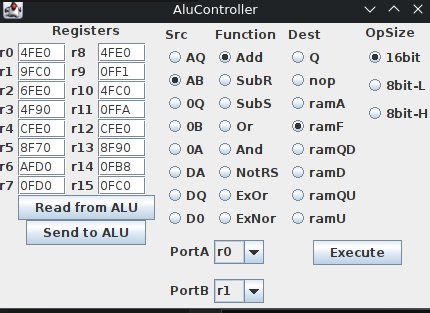
The new ALU Operation panel: source, function and destination selectors, the operand size, and the PortA and PortB register pickers feeding the Execute button.

With this I can control almost all lines into the board, and execute an ALU operation. When the "execute" button is pressed the selected values are sent to the Arduino, and that sets the appropriate pins and toggles the clock signals (and latches the flags).

With this I can finally take a look at what those things all really do.

Fixing schematic and board, and adding more commands Fun with flags ;)
Last modified: 2026/09/06