
The RL02 Emulator
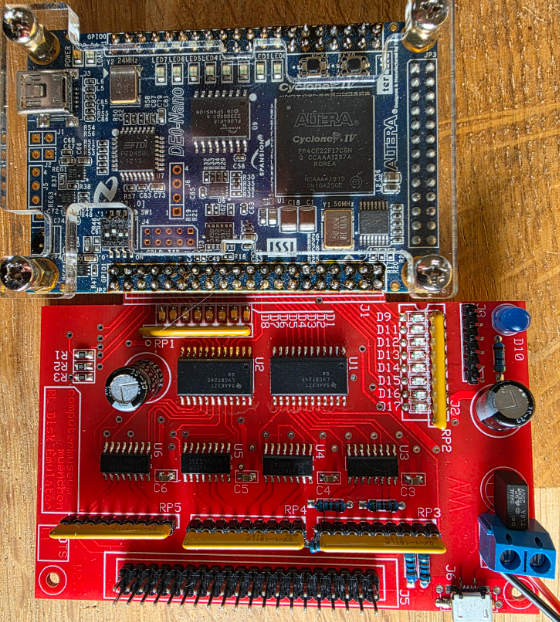
There is a RL02 emulator written by Reinhard Heuberger which can be found here. This uses a Terrasic DE10-Lite or DE0-Nano board. I got the Nano board.
Building
The PCB is rather easy to do. What was slightly problematic was the USB connector; it took some time to find the right one and soldering it was a bit challenging. The same went for the SD card connector. I opted to add the optional LEDs for the dip switches so I mounted those at the bottom.
Programming the device
After populating the PCB the next round was to get the code programmed. That took a bit of effort..
First, you will need to download the Quartus Lite (free) version, and you need version 13.1 or 14.0 for the code to work(!). I found it here. Download the installer, untar it and run the setup.sh.
Then we need the data to flash. There is a zip file with all data prepared which can be found by following the "Previous development" link and searching for the DE0-Nano implementation. The zip file contains the flash files and a few scripts to program the code. I am using Linux here, of course.
The first issue is that files have Windows encoding and that does not go well. Use dos2unix to convert the myflash*.sh files and the nios2-flash-override.txt file.
Secondly, create a helper file to set up the command line environment. I added the file quartus13 to ~/bin containing the following:
#!/bin/bash

export R=/home/jal/opt/intelFPGA/13.1/
export PATH=$PATH:$R/quartus/bin:$R/nios2eds/bin
export LD_LIBRARY_PATH=/home/jal/opt/intelFPGA/13.1/quartus/linux

echo "Entering Quartus env"
/bin/bash
Before running one of the scripts you need to run this script so that paths are set up correctly.
Next problem was that some tools were reporting script errors around replacements. This was caused by the shebang #!/bin/sh being used in many scripts which does not work. The solution is to replace it with #!/bin/bash. This needs to be done not just in the myflash*.sh scripts but also in the scripts called from there that are part of the Quartus installation! Just fix them one by one following the error messages.
The final issue was that the last part of programming which was done by the nios2-flash-programmer failed with:
EPCS signature is 0x16
EPCS identifier is 0x010216
No EPCS layout data - looking for section [EPCS-010216]
Unable to use EPCS device
Leaving target processor paused
This took quite some time to fix because most advice I found was Just Wrong(tm). The actual solution was pretty simple: in the myflash*.sh script add the following to both nios2-flash-programmer lines:
--override=nios2-flash-override.txt
Most tips I found were telling me to copy that file everywhere, clearly that was wrong.
After that flashing worked:
         *************************************
         ***** Make the Design permanent *****
         *************************************
         **** flash the design into EPCS ****

  Note: Unfortunately, the flash program does not work with version 15 or 16
                       Please use the flash program of version 13.1 or 14.0

         1) load a NIOS-II processor ....
1) USB-Blaster [9-3]
  020F30DD   EP3C25/EP4CE22


Info: *******************************************************************
Info: Running Quartus II 32-bit Programmer
Info: Command: quartus_pgm --no_banner --mode=jtag -o p;././in_EPCS/rl02_simulator_V3.sof
Info (213045): Using programming cable "USB-Blaster [9-3]"
Info (213011): Using programming file ././in_EPCS/rl02_simulator_V3.sof with checksum 0x003FCE0E for device EP4CE22F17@1
Info (209060): Started Programmer operation at Fri May 15 17:47:56 2026
Info (209016): Configuring device index 1
Info (209017): Device 1 contains JTAG ID code 0x020F30DD
Info (209007): Configuration succeeded -- 1 device(s) configured
Info (209011): Successfully performed operation(s)
Info (209061): Ended Programmer operation at Fri May 15 17:47:57 2026
Info: Quartus II 32-bit Programmer was successful. 0 errors, 0 warnings
    Info: Peak virtual memory: 142 megabytes
    Info: Processing ended: Fri May 15 17:47:57 2026
    Info: Elapsed time: 00:00:02
    Info: Total CPU time (on all processors): 00:00:00

2) start flashing....
>> sof2flash done
>> elf2flash done
Reading override file "nios2-flash-override.txt"
Using cable "USB-Blaster [9-3]", device 1, instance 0x00
Resetting and pausing target processor: OK
Processor data bus width is 32 bits
Looking for EPCS registers at address 0x00010000 (with 32bit alignment)
  Initial values: 0001703A 04C00074 9801483A 9CFFF804 983FFD1E 0000203A
  Not here: reserved fields are non-zero
Looking for EPCS registers at address 0x00010100 (with 32bit alignment)
  Initial values: 93000237 6300080C 603FFD26 90000335 A8000C26 03010004
  Not here: reserved fields are non-zero
Looking for EPCS registers at address 0x00010200 (with 32bit alignment)
  Initial values: 02C02004 002EE03A 00000F06 90000335 4000683A 0017883A
  Not here: reserved fields are non-zero
Looking for EPCS registers at address 0x00010300 (with 32bit alignment)
  Initial values: 003FD006 5280040C 501496FA 701CD07A 729CB03A 843FFFC4
  Not here: reserved fields are non-zero
Looking for EPCS registers at address 0x00010400 (with 32bit alignment)
  Initial values: 00000000 00000000 00000260 00000000 00000000 00000001
  Valid registers found
EPCS signature is 0x16
EPCS identifier is 0x010216
Using EPCS size information from section [EPCS-010216]
Device size is 8MByte (64Mbit)
Erase regions are:
  offset  0: 128 x 64K
EPCS status is 0x00
              : Checksumming existing contents
00000000      : Verifying existing contents
00000000      : Needs erase then program
00010000      : Verifying existing contents
00010000      : Needs erase then program
00020000      : Verifying existing contents
00020000      : Needs erase then program
00030000      : Verifying existing contents
00030000      : Needs erase then program
00000000      : Reading existing contents
00010000      : Reading existing contents
00020000      : Reading existing contents
00030000      : Reading existing contents
Checksummed/read 256kB in 2.5s
00000000 ( 0%): Erasing
00010000 (25%): Erasing
00020000 (50%): Erasing
00030000 (75%): Erasing
Erased 256kB in 1.2s (213.3kB/s)
00000000 ( 0%): Programming
00010000 (25%): Programming
00020000 (50%): Programming
00030000 (75%): Programming
Programmed 242KB +14KB in 2.0s (128.0KB/s)
Did not attempt to verify device contents
Leaving target processor paused
Reading override file "nios2-flash-override.txt"
Using cable "USB-Blaster [9-3]", device 1, instance 0x00
Resetting and pausing target processor: OK
Processor data bus width is 32 bits
Looking for EPCS registers at address 0x00010000 (with 32bit alignment)
  Initial values: 0001703A 04C00074 9801483A 9CFFF804 983FFD1E 0000203A
  Not here: reserved fields are non-zero
Looking for EPCS registers at address 0x00010100 (with 32bit alignment)
  Initial values: 93000237 6300080C 603FFD26 90000335 A8000C26 03010004
  Not here: reserved fields are non-zero
Looking for EPCS registers at address 0x00010200 (with 32bit alignment)
  Initial values: 02C02004 002EE03A 00000F06 90000335 4000683A 0017883A
  Not here: reserved fields are non-zero
Looking for EPCS registers at address 0x00010300 (with 32bit alignment)
  Initial values: 003FD006 5280040C 501496FA 701CD07A 729CB03A 843FFFC4
  Not here: reserved fields are non-zero
Looking for EPCS registers at address 0x00010400 (with 32bit alignment)
  Initial values: 00000000 00000000 00000260 00000000 00000000 00000001
  Valid registers found
EPCS signature is 0x16
EPCS identifier is 0x010216
Using EPCS size information from section [EPCS-010216]
Device size is 8MByte (64Mbit)
Erase regions are:
  offset  0: 128 x 64K
EPCS status is 0x00
              : Checksumming existing contents
00030000      : Verifying existing contents
00030000      : Already programmed with correct data
00040000      : Verifying existing contents
00040000      : Already programmed with correct data
00050000      : Verifying existing contents
00050000      : Already programmed with correct data
Checksummed/read 115kB in 1.1s
Erase not required
00030000 ( 0%): Programming
00040000 ( 0%): Programming
00050000 ( 0%): Programming
Programmed 115KB in 0.0s
No change to device contents
Leaving target processor paused

finished